Paprika
“If I had to give up all apps but one, Paprika would be the one I would save.”
“I can’t even tell you how much I love this app!”
“If there is one app that I would not be able to live without, it is this one.”
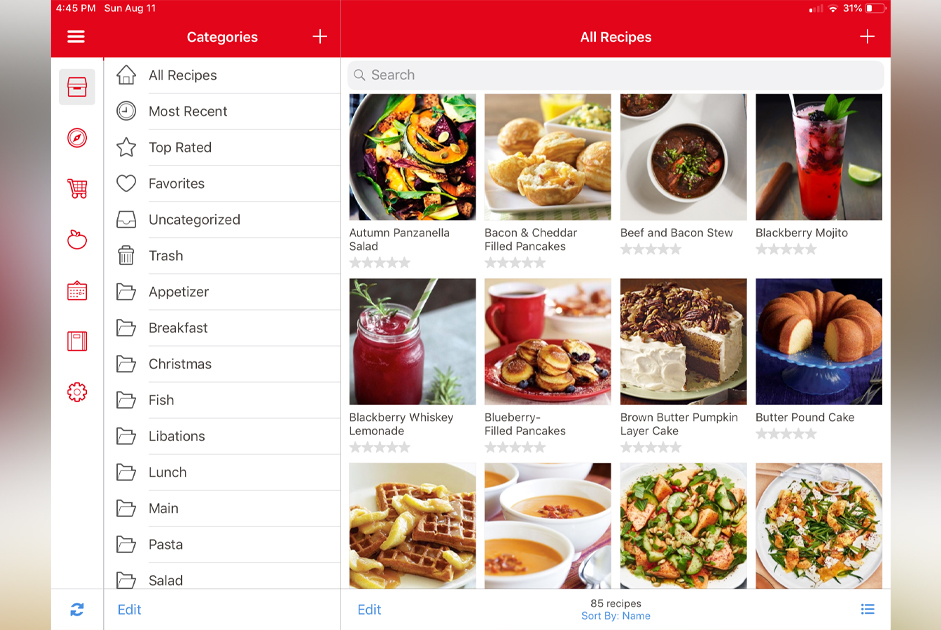
It’s no wonder home cooks give this app rave reviews! Paprika becomes your personalized, super convenient digital recipe box, combining in one place all of your family favorite recipes along with as many seamlessly downloaded recipes as you wish from premier cooking websites like America’s Test Kitchen, Food Network and Pillsbury. You can categorize all of your recipes and organize them in folders that you name. For example, you can create broad general category folders such as Breakfast, Christmas or Slow Cooker. You can also name your folders by recipe ingredients: chicken, seafood, turkey, etc. On my phone, you’ll find folders for Smoothies, Pampered Chef and even one called Non-Edible Crafts where I keep recipes for cinnamon Christmas ornaments, homemade Play-Doh and potpourri.
My personal favorite Paprika features are:
Grocery List
This genius feature allows you to keep a running grocery list on your phone and, if your family members or roomies also have Paprika, the list will sync to their devices. As items are purchased, you simply check them off the list. No matter who is doing the shopping, everyone always has the same up-to-date list.
Making your grocery list is nearly effortless. Choose the Paprika recipe you want to make, touch one button and the list of all the recipe ingredients appears. Delete anything you already have on hand, then select “Add to My Grocery List” and the ingredients you need appear on your running grocery list – automatically sorted by grocery store aisle! If you need to keep separate lists for different kinds of shopping, such as hardware items or pet supplies, you can create as many lists as you want.
Recipe Sharing
To share a recipe with anyone who also has Paprika, simply click “Share” and the recipe arrives ready to import to their Paprika app. To share with someone who doesn’t have the app, you can print it out or email it. If you print, you can opt for an index card size. When emailed, the recipe displays exactly as it appears in the app, including the photo of the food if you had one.
Recipe Scaling
If you want to, for example, double or even quadruple a recipe or cut it in half, Paprika does all the math for you. It can scale recipes up or down, according to how many servings you want to make.
If you cook, trust me, you will love Paprika!
Fig
Are you allergic to shellfish? Sensitive to sulfites or lactose intolerant? Does your child have a peanut allergy? Do you want to avoid artificial food coloring? No matter what your unique food fingerprint may be, the Fig app has got you covered.
Fig stands for food is good. The mission of the Fig app is simply to “make dealing with dietary restrictions a heck of a lot easier.” And, seriously, what could be easier than this: holding your phone over the bar code on a product in your grocery store aisle? After you have created your
Fig profile, in which you’ve identified your allergies and the ingredients you want to avoid, Fig’s barcode scanner lets you instantly check more than 300,000 product labels, alerting you to the products with ingredients you should avoid as well as the products that will work for you. The feedback is color coded green, yellow or red. If your scan finds any ingredient that raises a red flag, you can drill down on that ingredient to get more information.
Fig works at most major American grocery store chains, including Publix, Food Lion, Aldi and Harris Teeter. It is available for iOS and Android. The free version provides unlimited searches and five scans a month. The upgraded version, Fig+, gives users an unlimited number of scans plus access to features like grocery store filtering and early access to Fig restaurants (“Can I eat here?”), currently in beta, which may be available soon.
If you have food allergies or sensitivities, or just want to make healthier food choices for yourself and your family, Fig may just become your one “can’t live without it” app.